Welcome to the 3 Clicks Cloud Documentation Portal
This portal is your centralised hub for understanding and navigating the 3 Clicks Cloud platform. Whether you're new to our SaaS ecosystem or an experienced user looking to deepen your knowledge, this documentation provides the clarity and support you need to maximise your productivity.
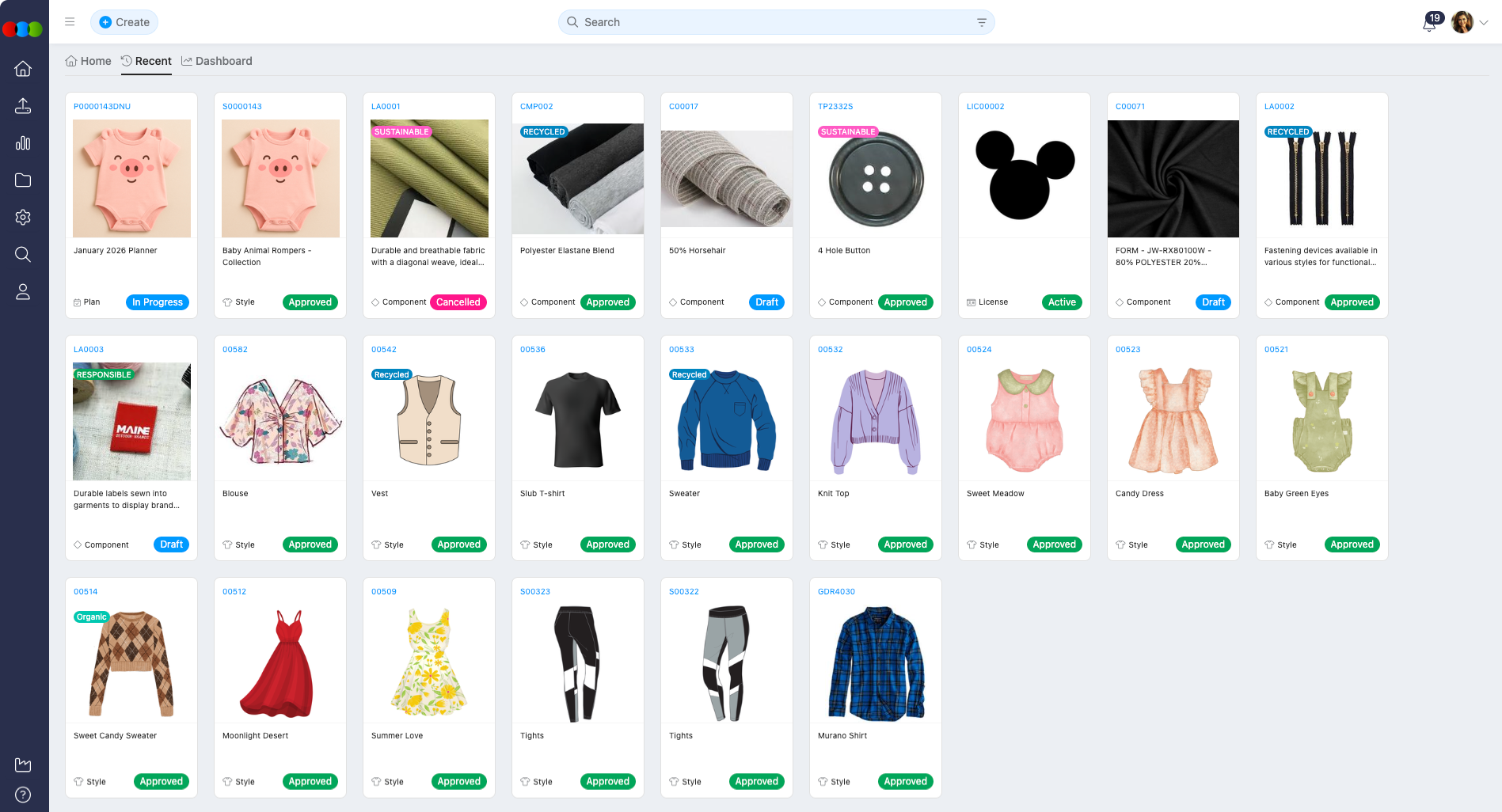
Overview
3 Clicks Cloud is a modular platform designed specifically for the apparel industry. From claims and styles to compliance and shipping, each module is purpose-built to streamline your operations and connect your entire supply chain.
This guide will help you:
- Understand the documentation structure
- Find relevant guides and reference materials quickly
- Set up your workspace and configure settings
- Work confidently within each module
- Navigate efficiently to the information you need
Quick Start Guide
I'm New Here - Where Do I Start?
For End Users:
- Start with Order Management - Learn how to create and manage production orders
- Explore Style Management - Understand how to build your product library
- Check out Search & Data Management - Master common operations
For Administrators:
- Begin with Site Settings Overview - Configure your platform
- Set up Company Settings - Establish your business foundation
- Configure Roles and Permissions - Manage user access
For Implementers:
- Review Site Settings - Understand all configuration options
- Explore API Documentation - Learn integration capabilities
- Check Release Notes - Stay current with platform updates
Core Modules
Product Development & Management
Style
Your digital design library and product development hub. Create and manage styles, specifications, bill of materials, and product information.
Key Features:
- Centralised style library with detailed product information
- Bill of materials management
- Technical specification storage
- eCommerce integration support
- Costing and order integration
Quick Links:
Component
Manage individual components and materials used across multiple styles. Track inventory, pricing, and component relationships.
Key Features:
- Component library management
- Inventory tracking
- Colour and pricing management
- Style and order relationships
Quick Links:
License
Manage licensing agreements, royalties, and licensor relationships for your products.
Key Features:
- License agreement tracking
- Royalty management
- Licensor relationship management
- License item tracking
Quick Links:
Order & Production Management
Order
Create and manage production orders with comprehensive tracking, scheduling, and collaboration tools.
Key Features:
- Single-item and bulk order creation
- Critical path tracking
- Purchase order generation
- Sample management
- Shipping and logistics tracking
Quick Links:
Sales Order
Manage customer sales orders and track order fulfillment from creation to delivery.
Key Features:
- Sales order creation and management
- Style association
- Order tracking and status management
Quick Links:
Planner
Plan and manage product collections, budgets, and style planning across seasons and collections.
Key Features:
- Collection planning
- Budget target management
- Style planning and organisation
- Order creation from plans
Quick Links:
Quality & Compliance
Claim
Track and resolve product or order issues, recover costs, and maintain supplier accountability.
Key Features:
- Quick claim creation
- Cost recovery tracking
- Supplier performance insights
- Document and image management
Quick Links:
Compliance
Manage audits, licenses, and compliance checks for suppliers and factories to ensure standards and legal requirements are met.
Key Features:
- Supplier compliance tracking
- Audit management
- License management
- Compliance history
Quick Links:
Operations & Logistics
Shipping
Manage shipments, track logistics, and coordinate delivery of orders to their destinations.
Key Features:
- Shipment creation and management
- Order assignment to shipments
- Freight status tracking
- Shipping document management
Quick Links:
Costing
Create and manage product costings with detailed breakdowns, templates, and cost analysis.
Key Features:
- Multiple costing types (Component, Retail, Import)
- Cost template management
- Exchange rate handling
- Cost history tracking
Quick Links:
Collaboration & Portals
Customer Portal
Enable your customers to browse products, place orders, and manage their accounts through a self-service B2B portal.
Key Features:
- B2B online store browsing
- Customer account management
- Staff management
- Company details management
Quick Links:
Supplier Portal
Provide suppliers with controlled access to orders, files, and critical path information they need to fulfill their responsibilities.
Key Features:
- Supplier account management
- File access and sharing
- Critical path management
- Sample report management
- Notification management
Quick Links:
Tools & Utilities
Dashboard
Create custom dashboards with charts and visualizations to monitor key metrics and KPIs.
Key Features:
- Custom chart creation
- Data visualisation
- KPI monitoring
- Dashboard customisation
Quick Links:
Search
Powerful search functionality to quickly find styles, orders, components, and other records across the platform.
Key Features:
- Advanced search capabilities
- Data management operations
- Bulk actions
- Quick record access
Quick Links:
Drive
Centralised file management system for storing, organising, and sharing documents across your organisation.
Key Features:
- File storage and organisation
- Document management
- File sharing capabilities
Quick Links:
Reports
Generate comprehensive reports across all modules for analysis, compliance, and decision-making.
Available Reports:
- Admin Reports
- Order Reports
- Style Reports
- Component Reports
- Costing Reports
- Compliance Reports
- License Reports
- Planner Reports
- Sales Order Reports
Configuration & Administration
Site Settings
Comprehensive configuration hub for customizing your platform to match your business requirements.
Company Settings:
- General Settings
- Roles and Permissions
- Staff Management
- Customer Management
- Supplier Management
- Currency & Tax
- AI Configuration
Module-Specific Settings:
- Order Settings
- Style Settings
- Component Settings
- Shipping Settings
- Costing Settings
- Compliance Settings
- Claim Settings
- Planner Settings
Quick Links:
Security & Authentication
Multifactor Authentication (MFA)
Enhance account security with multifactor authentication to protect your platform access.
Quick Links:
Integration & Development
API
Access the 3 Clicks Cloud API for programmatic access and integration with external systems.
Quick Links:
Integration
Connect 3 Clicks Cloud with external platforms and services.
Available Integrations:
Additional Resources
AI Assistant
Get help and answers using the AI-powered chatbot assistant integrated into the platform.
Quick Links:
AI Billing
Understand how AI usage is tracked and billed within the platform.
Quick Links:
Support Tickets
Create and manage support tickets directly within the platform for technical assistance.
Quick Links:
Release Notes
Stay up-to-date with the latest platform updates, new features, and improvements.
Quick Links:
Navigation Tips
Using the Documentation Portal
Left Side Widgets Navigation:
- Use the left-hand side widgets to navigate to module-specific pages
- Expand sections to see all available topics
- Each module has an overview page to get you started
Search Functionality:
- Use the search bar at the top to quickly find field descriptions, workflows, and admin settings
- Search results are prioritised by relevance
- The overview page has boosted search priority for easy discovery
In-Page Navigation:
- Follow links within each page to explore related topics
- Use "Quick Links" sections for common tasks
- Check "Related Configuration" sections for admin settings
Breadcrumbs:
- Use breadcrumbs at the top of each page to navigate back to parent sections
- Quickly understand your current location in the documentation hierarchy
Who is this Portal For?
This documentation is designed for different user roles:
| Role | Primary Use Cases | Recommended Starting Points |
|---|---|---|
| End Users | Learn how to enter, view, and update data in each module | Order Management, Style Management, Search |
| Administrators | Configure dropdowns, user roles, and site-wide settings | Site Settings, Roles and Permissions |
| Implementers | Set up customer environments and integrations | Site Settings, API Documentation |
| Managers | Monitor operations and generate reports | Dashboard, Reports |
| Suppliers | Understand supplier portal functionality | Supplier Portal |
| Customers | Learn about customer portal features | Customer Portal |
Common Workflows
Creating a New Product
- Create a Style - Start with your product design
- Add Style Details - Complete product information
- Define Specifications - Add technical details
- Create Costing - Calculate product costs
- Create Order - Place production order
Managing an Order
- Create Order - Start a new production order
- Add Colours & Pricing - Define quantities
- Set Critical Path - Track milestones
- Manage Samples - Handle sample requirements
- Track Shipping - Manage delivery
Site Settings Configuration
- Company Settings - Configure basic information
- Roles and Permissions - Set up user access
- Style Settings - Configure style options
- Order Settings - Set up order workflows
- Shipping Settings - Configure logistics
Getting Help
Documentation Support
- Search First: Use the search bar to find answers quickly
- Check Module Overviews: Each module has a comprehensive overview page
- Review Quick Links: Most pages include quick links to common tasks
Technical Support
- Support Tickets: Create a ticket using Support Tickets
- Contact Us: Reach out via our contact page
- AI Assistant: Use the AI Assistant for instant help
Stay Updated
- Release Notes: Check Release Notes for latest updates
- Blog: Visit our blog for tips and news
Feedback and Support
We're always improving! If you find anything unclear or need additional help, please reach out to our support team or use the Feedback button in the portal.
Happy clicking!