Release Notes - 7th of July 2026
Reports > Favourite Reports > 50 Maximum Reports
You can now save up to 50 favourite reports in Reports.
Keep more of your most-used report views readily accessible from Reports without removing an existing favourite to add another.
Learn more
For guidance on saving favourites, configuring report views, and updating saved layouts, see Reports > Overview in the documentation portal.
Reports > Orders > Milestone Orders > Export
We've improved the Milestone Orders export so price and value columns are easier to read and work with in Excel.
Price and value fields now export as numeric values only. A dedicated currency column appears immediately after each related price field:
- Buy Price Currency follows Buy Price
- Sell Price Currency follows Sell Price
- RRP Price Currency follows RRP Price
- Alt RRP Currency follows Alt RRP
Report Milestone Orders Export 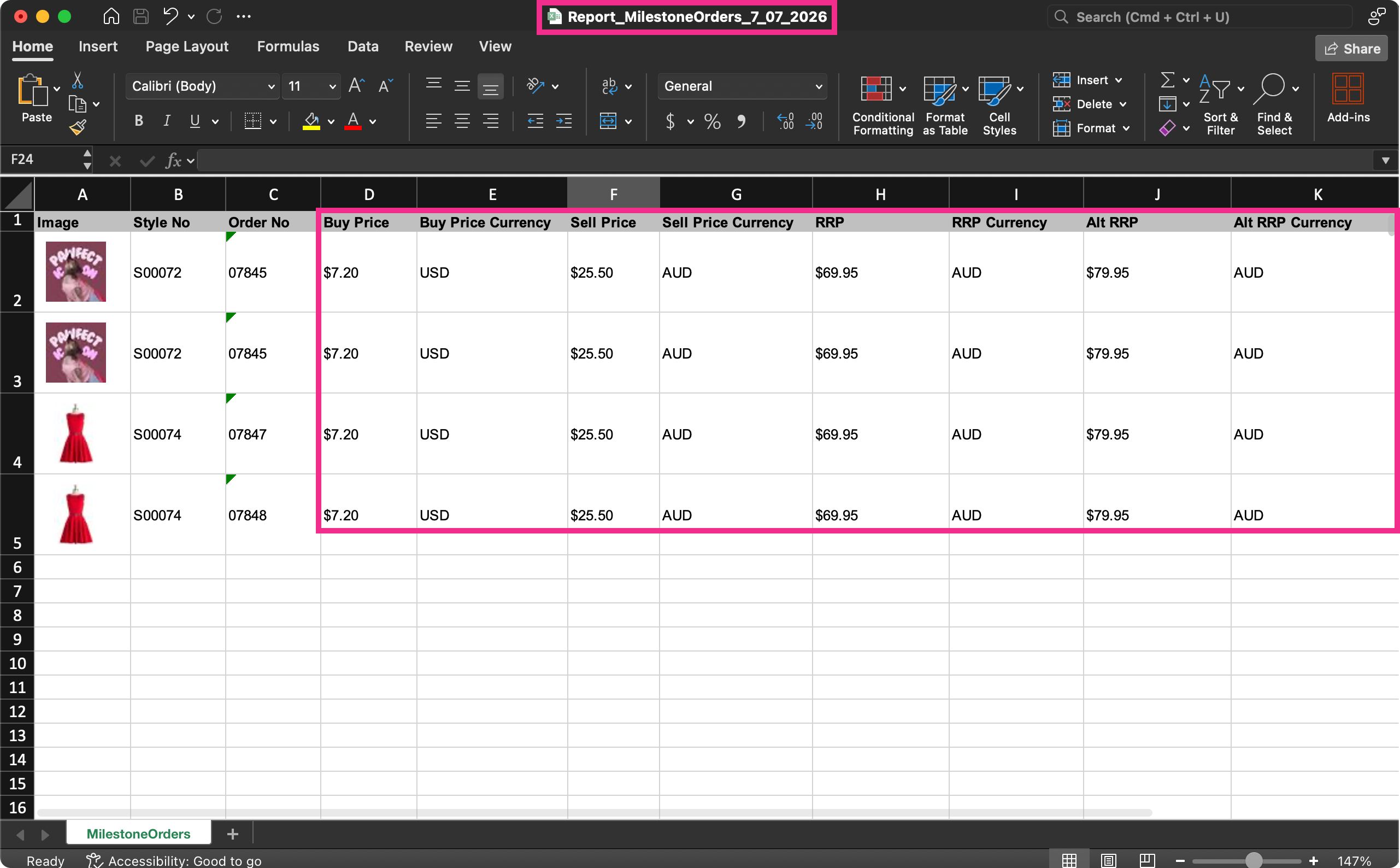
Learn more
For report configuration options including filters, columns, save, and export, see Reports > Orders > Milestone Orders in the documentation portal.
Reports > Update Existing Favourites
We've fixed an issue where Update Existing Favourite was only available when saving favourites from the Milestone Orders report.
You can now update an existing favourite from any report in Reports. Open your favourite, make the adjustments, click Save, and choose Update Existing Favourite to store your changes without creating a duplicate.
Reports > Order > Milestone Orders > Critical Path
We've fixed an issue where the Critical Path filter in Milestone Orders returned no results when you selected a specific critical path, even when matching orders existed. The report only displayed data when All Critical Paths was selected.
Selecting a specific Critical Path now returns all orders assigned to that path.
Reports > Export > Preview Images
We've fixed an issue where preview images were included in report exports even when the Image column was not selected or displayed in the report view.
Exported reports now include preview images only when the Image column is visible in your current report layout.
Planner > Styles
We've fixed an issue where when Sort By is blank, the system applies an automatic sort to your Planner items.
This has been fixed. Styles and colourways now stay in the order you set manually, using their saved display each time you open the planner.
Note
When you choose values in Sort By 1st or Sort By 2nd, styles are ordered by those selections instead of your manual arrangement.
Order > Documents > Purchase Order Form > Definition
Previously, when you added a component with Composition in Style > Definition and generated a Purchase Order Form for the related order, the composition text appeared twice in the document's Definition section.
This has been fixed.
Thank you for helping us make things better! If you spot anything else, let us know — we're always here to help.
Happy clicking!
Previous Release Notes