Release Notes - 19th of May 2026
Style > eCommerce
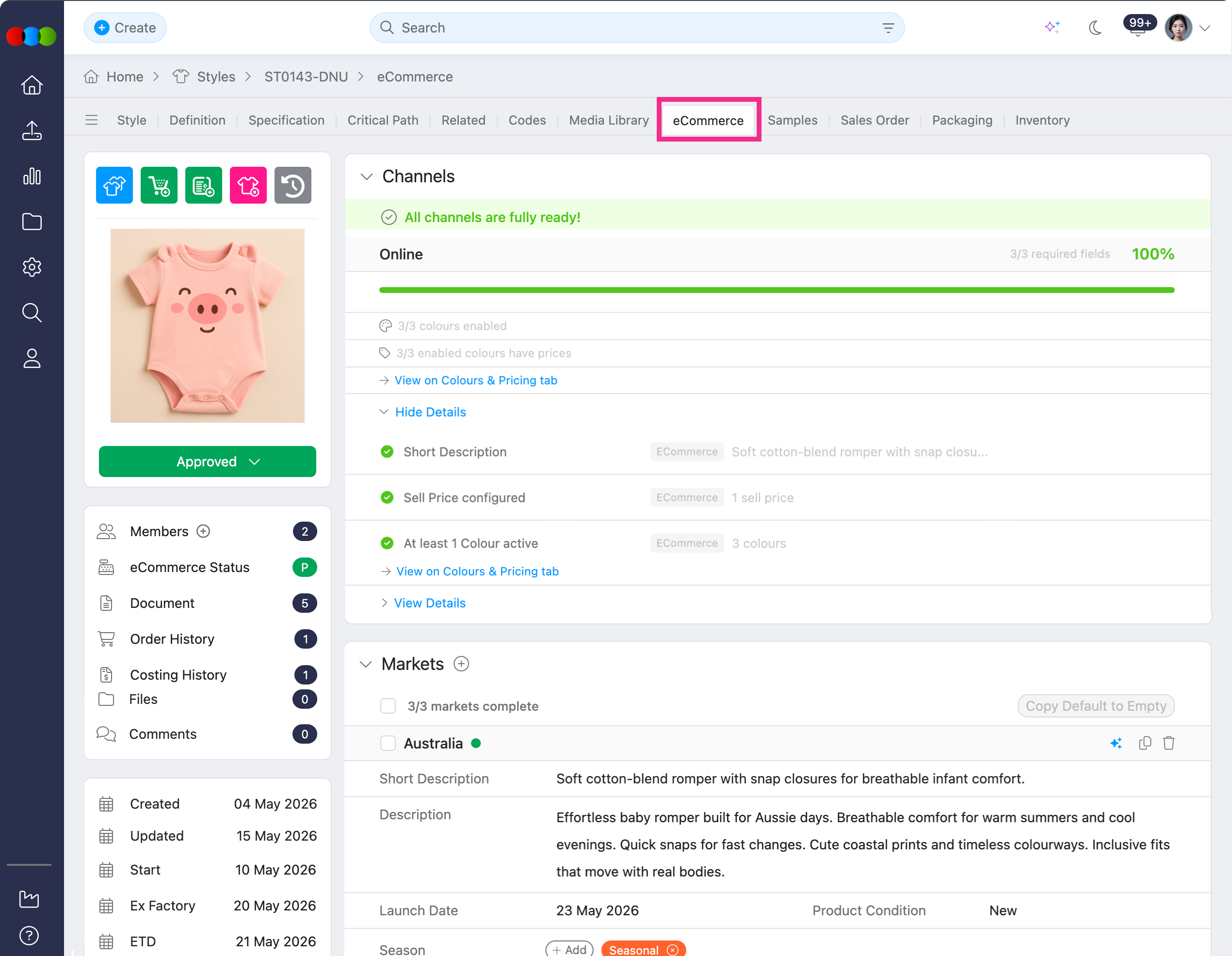
We have refreshed Style > eCommerce with improved display, AI tools, new Channels support, and versioned publishing to help teams manage and publish eCommerce data more confidently.
What’s new?
- Easier navigation across Details, Images, Tags, Colours & Pricing, Channels, Markets, and Similar Styles.
- Markets now supports AI-generated descriptions, Market Custom Fields, and bulk actions for copying or deleting values.
- Tags now includes AI-suggested tags based on your prompts and existing tag setup.
- New Channels section shows channel readiness, enabled colours, pricing status, and overall completion percentage based on your Site Settings > Style > Channels configuration.
- Publish now creates version snapshots with version history, compare, rollback, and republish options for safer publishing control.
- Colours & Pricing now includes expand/collapse size views, AI-generated marketing colour descriptions, channel pricing controls, bulk size selection, and image uploads.
Learn More
To dig deeper on how these improvements could help you, head to these following documentations:
- Style › eCommerce for tab layout, Details, Images, Tags, Colours & Pricing, Channels, Markets, and publishing behaviour
- Site Settings › Style › Channels for configuring channel names, descriptions, and Readiness Fields
- Site Settings › Style › Market Custom Fields for defining the fields that appear under Markets
- Style › Side Widgets › eCommerce Status for Version History, viewing, comparing, Rollback, and republish
- Site Settings › Company › AI Prompts for prompts that shape AI-generated eCommerce text where your organisation uses AI
Site Settings > Order > Critical Path
Previously, when you duplicated an existing critical path in Site Settings > Order > Critical Path, activity due dates on single-digit days of the month (the 1st to the 9th) were not always copied correctly to the new template. Due dates on double-digit days (the 10th to 31st) were not affected.
Now, when you duplicate a critical path, all activity due dates are preserved on the duplicated template. Single-digit and double-digit due dates match the original critical path.
Order > Samples > Sample Report > Refresh
Previously, if a measurement was deleted from Style > Specification after updates had already been made in an Order > Samples > Sample Report, reopening the report could make some saved measurement details appear missing unless the report was refreshed.
Now, Order > Sample Reports keep displaying saved measurement data until you choose to refresh measurements. Deleting a specification measurement no longer automatically clears stored fields from the report view.
Note
This fix applies to Order > Sample Reports only. Style > Sample Reports still reference some fields directly from Style > Specification, so deleted specification measurements cannot currently be restored there.
Adobe Illustrator > 3 Clicks Cloud Plug-in
Some users were seeing a Login failed error when signing in to the 3 Clicks Cloud plug-in in Adobe Illustrator, even when using valid credentials.
This issue has now been resolved.
Thank you for helping us make things better! If you spot anything else, let us know — we're always here to help.
Happy clicking!
Previous Release Notes