Costing Search
Costing Search lets you find and manage costing records across your organisation. This provides access to all costing records with standard search features: bulk actions, column grouping, inline editing, favourites, and export.
Costing View
Use the view selector to switch between high-level Costing rows (one per style) and Costing by Colour rows (one per style and colour).
| View | Summary |
|---|---|
| Costing | One row per costing and style; colours limited to those selected on the costing; preview image and style number per style row. 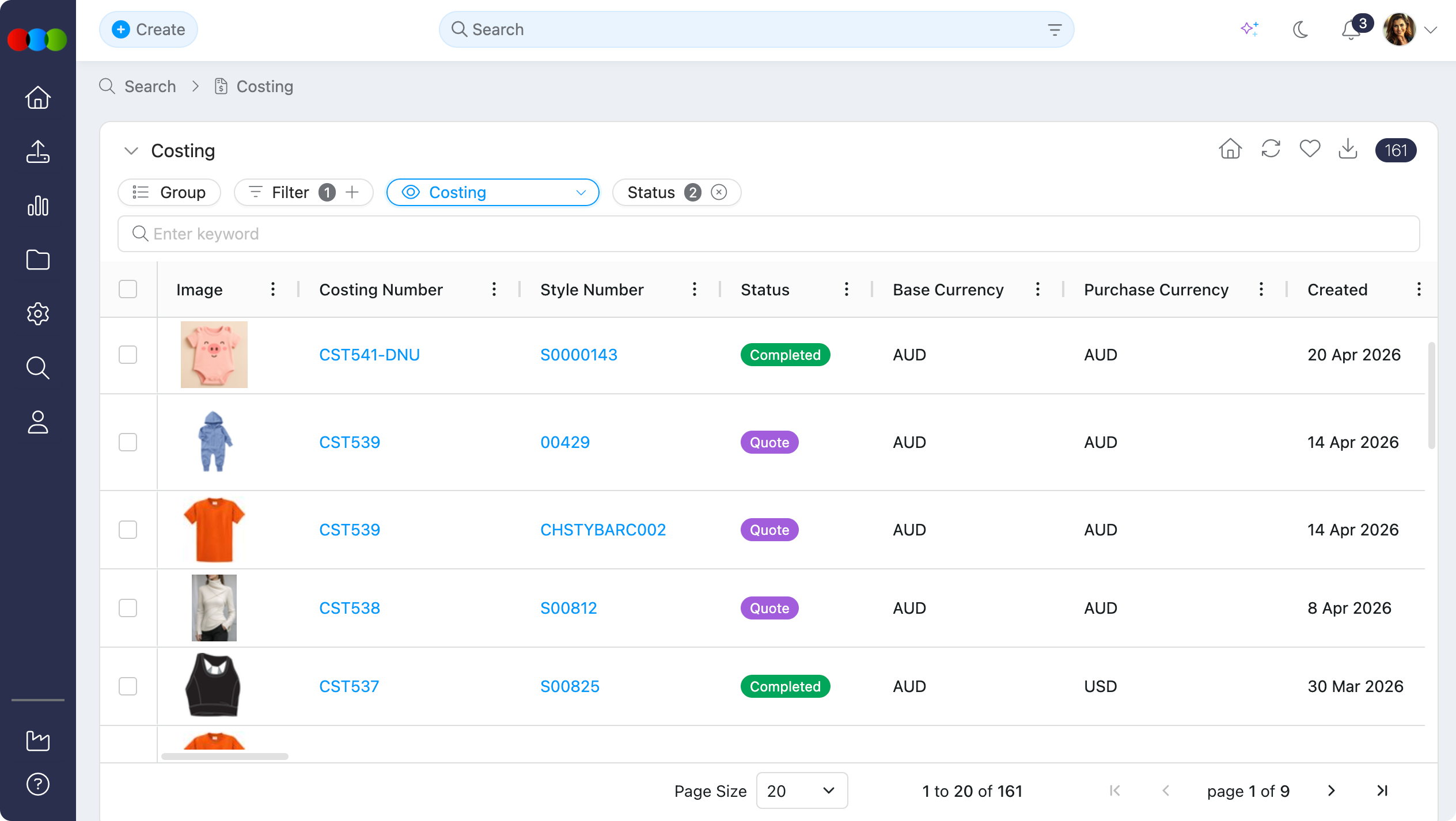 |
| Costing by Colour | One row per costing, style, and colour; same colour and image rules as above. 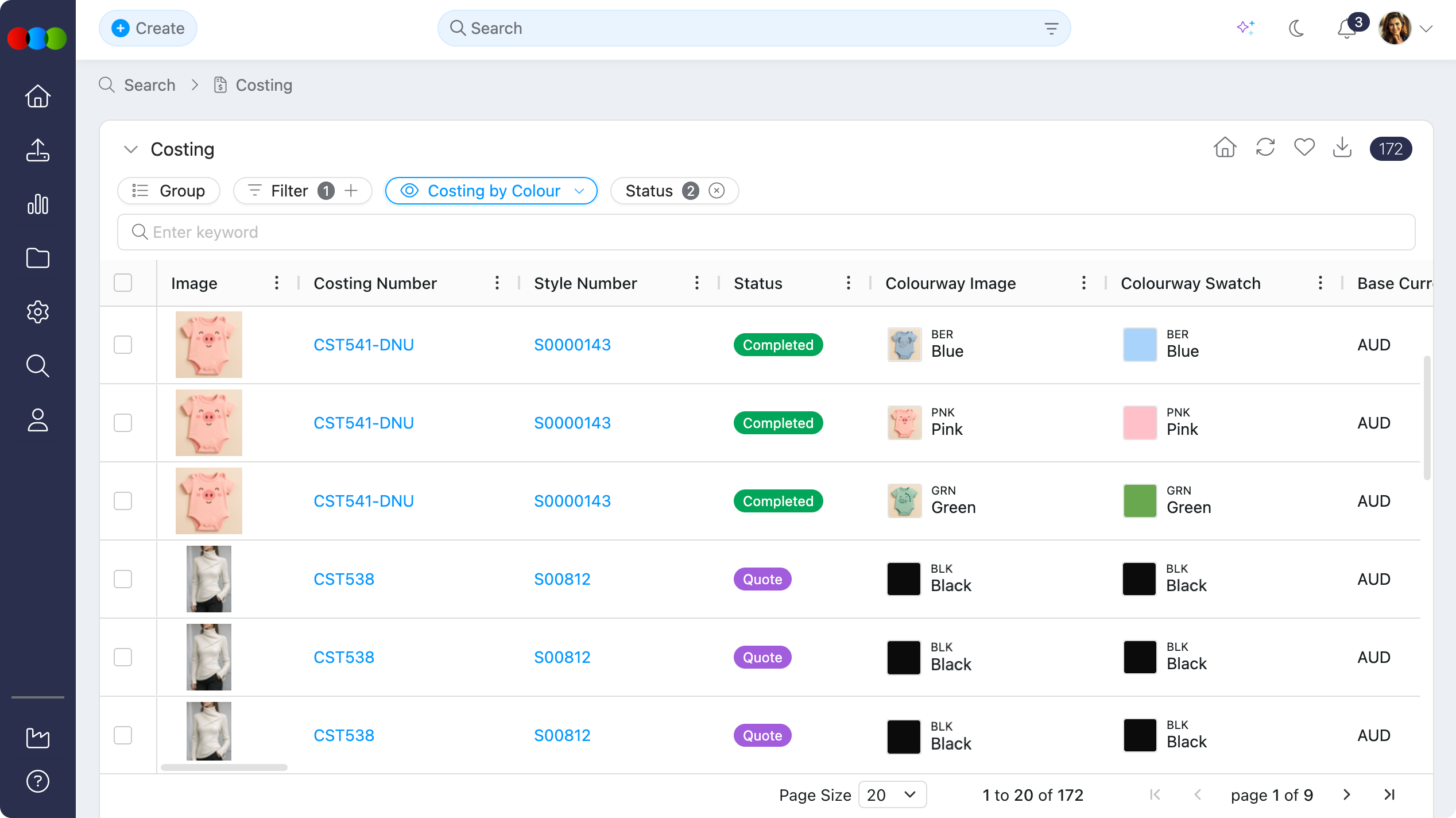 |
View Options
| Aspect | Costing | Costing by Colour |
|---|---|---|
| Styles | Displays all styles included in the costing. | Displays all styles by colour as defined on the costing. |
| Rows | One row per costing and style (one costing/style combination per row). | One row per costing, style, and colour (one costing/style/colour combination per row). |
| Style Colours | Only colourways selected on the costing are included. | Only colourways selected on the costing are included. |
| Image and Style Number | Each row shows that style’s preview image and style number for the style. | Each row shows the preview image and style number for the style. |
Columns Available
You can customise your Costing Search view by adding or removing columns. Columns are organised under category headings in Choose Columns. The following columns are available:
Standard Columns
| Column | Description | Editable |
|---|---|---|
| Image | Preview image for the style on the row. When a costing includes multiple styles, each row shows that style’s preview. | No |
| Agent | Agent associated with the costing supplier. Clicking the agent displays the Company Details pop-up. This can be configured in Site Settings › Company › Suppliers. | No |
| Costing Number | Unique identifier for the costing. | No |
| Style Number | Style number for the style on the row. Multi-style costings list each style on its own row in the Costing view (and per colour in Costing by Colour). | No |
| Status | Current costing status (e.g., Completed, Draft, Cancelled, Quote). | Yes |
| Description | Brief summary of the costing. | Yes |
| Factory | Production factory associated with the costing supplier. Clicking the factory displays the Company Details pop-up. This can be configured in Site Settings › Company › Suppliers. | No |
| Customer | Customer or retail channel for the costing. Options come from Site Settings › Company › Customer. | Yes |
| Account Manager | Internal account manager responsible for the costing. Options come from Site Settings › Company › Staff. | Yes |
| Buy Terms | Payment or purchase terms for the costing. | No |
| Department | Costing > Style > Department. Options come from Site Settings › Order › Department. | Yes |
| Season | Costing > Style > Season. Options come from Site Settings › Style › Season. | Yes |
| Template | Costing template used. | No |
| Base Currency | Base currency for costing calculations. | No |
| Estimated ETD | Costing > Style > Estimated ETD — estimated time of departure for the style on the costing. | Yes |
| Estimated Quantity | Costing > Style > Estimated Qty — estimated order quantity for the style on the costing. | Yes |
| Created | Date and time the costing was created. | No |
| License | License associated with the costing. | No |
| Purchase Currency | Currency used for purchase. | No |
| Style Description | Description of the associated style. | No |
| Costing Type | Type of costing (e.g., retail, wholesale). | No |
| Type | Style type or categorisation. | No |
| Actual EBIT % | Actual earnings before interest and tax percentage. | No |
| Collection | Collection the style belongs to. | No |
| Created By | User who created the costing record. | No |
| Final Buy Price | Final agreed buy price from the supplier. | No |
| Gender | Gender category for the style. | No |
| Gross Margin % | Gross margin percentage. | No |
| Gross Profit % | Gross profit percentage. | No |
| Required EBIT % | Target EBIT percentage. | No |
| RRP | Recommended retail price. | No |
| Sell Price | Sell price for the costing. | No |
| Size Scale | Size scale for the style. | No |
| Story | Product story or theme. | No |
| Updated | Date and time of the last update. | No |
| Colour Code | Internal code for the colourway. | No |
| Colour Description | Description of the colourway. | No |
| Colourway Drop | Colourway drop or release. | No |
| Colourway Image | Image of the colourway. | No |
| Colourway Swatch | Visual swatch for the colourway. | No |
| Colourway Tags | Tags associated with the colourway. | No |
| Composition | Material composition. | No |
| Country/Region | Country or region for the costing. | No |
| Final Quantity | Final agreed quantity from the supplier. | No |
| Landed Cost | Total landed cost including freight and duties. | No |
| Style Alt RRP | Alternative recommended retail price from the style. | No |
| Style Alt RRP 2 | Second alternative recommended retail price from the style. | No |
| Style Buy Price | Buy price from the style. | No |
| Style RRP | Recommended retail price from the style. | No |
| Style Sell Price | Sell price from the style. | No |
| Target Buy Price | Costing > Style > Target Buy Price - target buy price for the style on the costing. | No |
| Tariff | Tariff or duty information. | No |
| Total Cost | Total cost for the costing. | No |
| Available Colours | Colours available for the style. | No |
| Colour Family | The selected colour family for the style. | No |
| Completed Date | Date the costing was completed. | No |
| License Contract | Costing > Style > License Contract Description. | No |
| Quote Status | Costing > Supplier Quote > Status (e.g. Approved, Pending). | No |
| Similar Style Notes | Notes for similar styles. | No |
| Use Case | Intended use case for the costing. | No |
Style Custom Fields
| Column | Description | Editable |
|---|---|---|
| Style Custom Fields | Additional fields configured for styles in Site Settings. | Yes |
Style Custom Fields
Style Custom Fields are additional data fields configured for styles in Site Settings › Style › Custom Fields. When enabled, these columns appear in the Costing Search view, allowing you to display and filter by custom style-specific data set up in your company. Use the Choose Columns menu to add Style Custom Fields to your view.
Filter
Use filters to narrow your Costing Search results. The following filters are available:
| Filter | Description |
|---|---|
| Account Manager | Filter by account manager. The list for this filter depends on what was configured in Site Settings › Company › Staff. |
| Base Currency | Filter by base currency. |
| Buy Terms | Filter by buy terms. |
| Collection | Filter by collection. The list for this filter depends on what was configured in Site Settings › Style › Collection. |
| Completed Date | Filter by costing completion date. |
| Costing Type | Filter by costing type. |
| Created | Filter by creation date. |
| Created Between | Filter by date range when the costing was created. |
| Created By | Filter by user who created the costing. |
| Customer | Filter by customer. The list for this filter depends on what was configured in Site Settings › Company › Customer. |
| Department | Filter by department. The list for this filter depends on what was configured in Site Settings › Order › Department. |
| ETD | Filter by estimated time of departure. |
| Factory | Filter by factory. The list for this filter depends on what was configured in Site Settings › Company › Suppliers. |
| Gender | Filter by gender category. |
| Keywords | Search across costing fields by keyword. |
| License | Filter by license. |
| Recent | Filter by recently viewed or updated costings. |
| Season | Filter by season. The list for this filter depends on what was configured in Site Settings › Style › Season. |
| Status | Filter by costing status. |
| Story | Filter by story. The list for this filter depends on what was configured in Site Settings › Style › Story. |
| Type | Filter by style type. |
| Updated | Filter by last update date. |
| Updated Between | Filter by date range when the costing was last updated. |
Bulk Actions
Costing Search supports bulk actions with these functionalities:
| Action Bar | Fields |
|---|---|
| Actions | Remove from Costing — Detaches the costing from its associated order. Delete — Permanently removes the selected costing records. 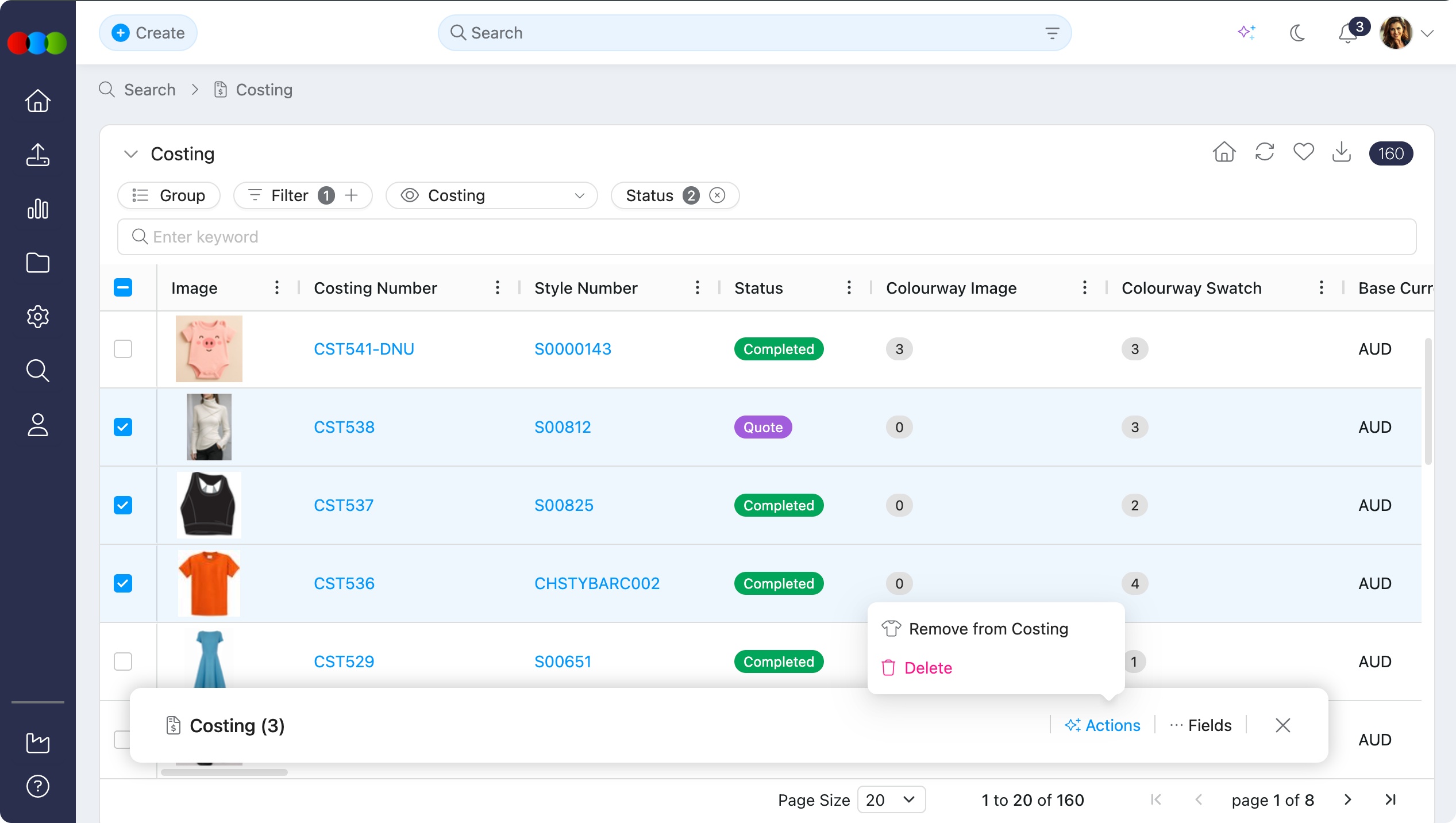 |
| Fields | Account Manager — Internal account manager responsible for the costing. Customer — Customer or retail channel for the costing. Department — Costing > Style > Department. Season — Costing > Style > Season. Status — Current costing status (e.g., Draft, Pending, Approved). 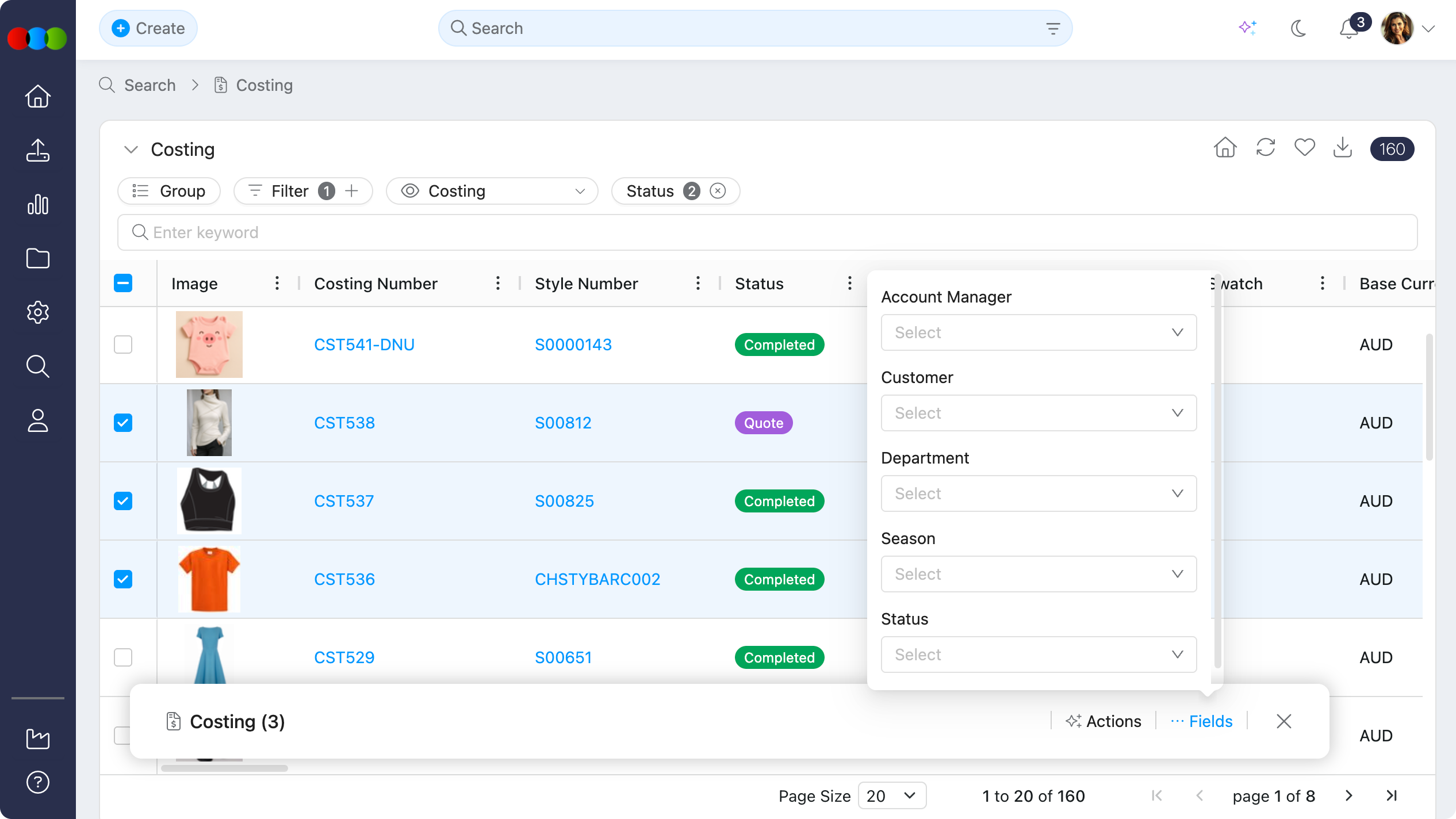 |
For full details on bulk actions and how to use them, see Manage Data in Search. |